Open vs Closed Ecosystems: Extensibility and Third-Party Apps on 2026 Humanoids
Open vs Closed Ecosystems in Humanoid Robots
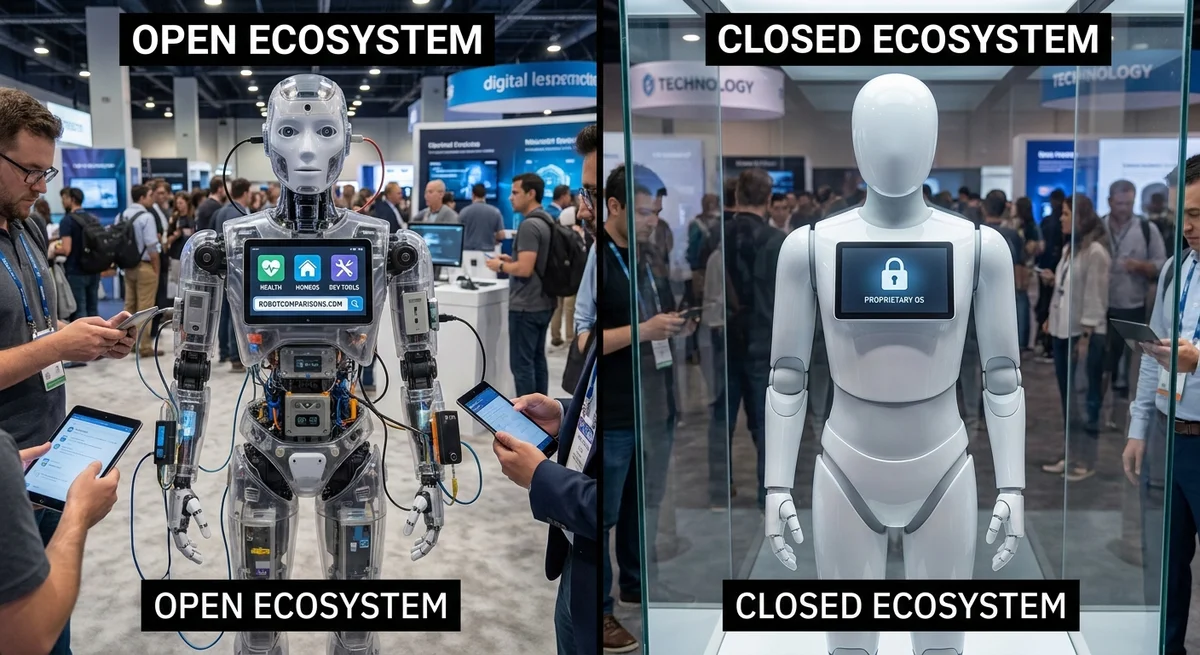
By 2026, many companies will offer humanoid robots – from friendly helpers at home to hardworking warehouse assistants. A key choice for buyers is whether the robot’s software platform is open or closed. An open ecosystem means the robot’s commands, data, and hardware interfaces are shared publicly so anyone can develop new apps or add devices. A closed ecosystem means only the maker controls what software or add-ons work with the robot. This choice affects how easy it is to extend the robot, how many third-party apps exist, and even how secure and long-lasting the system will be (www.awesomerobots.xyz) (www.techradar.com).
This article compares open vs closed platforms in 2026 humanoids. We look at API access, plug-in frameworks, hardware interfaces, and simulation support. We also check how many apps and how much community help each has, and what promises companies make about future updates. Finally, we discuss vendor lock-in versus quick integration and offer a simple framework to balance openness, security, and ease of maintenance.
What Are Open and Closed Robot Ecosystems?
An ecosystem here means the robot’s software platform and the tools around it. A truly open robot platform might give out its hardware blueprints, software code, and let anyone make plug-ins or parts. For example, Robotis built a humanoid called AI Sapiens K0 as an open research platform (ai.robotis.com): its designs, code, and simulator assets are all public (ai.robotis.com). This allows universities or startups to fork the project and add their own ideas.
By contrast, a fully closed system is locked down. The maker owns all the software, and only they can make updates or extensions. Many industrial robots work this way: they have reliable, tested software but users cannot modify or add to it.
In practice, most platforms fall between completely open and fully closed. For example:
- Hybrid open platforms use commercial hardware but run on open software. Some affordable robots like Unitree’s bipeds offer a ROS (Robot Operating System) driver and even publish code for motion routines. Unitree recently launched an open app store for its robot, where hobbyists can share dance or martial arts routines (www.techradar.com) (www.techradar.com).
- Commercial platforms with APIs are mostly proprietary hardware but let you write code. Boston Dynamics’ Spot (a four-legged robot) is an example: Spot’s API lets you read sensors and send movement commandsvia an official SDK (spot-sdk.netlify.app). You can’t change Spot’s internals, but you can write your own control programs and attach new sensors through defined interfaces.
In short, open platforms maximize flexibility and community innovation, while closed platforms often emphasize stability and vendor support. Real robots often mix these approaches: you might get a locked hardware design but some open software hooks to program it.
API Accessibility and Plugin Support
A robot’s API (Application Programming Interface) is how developers write code to make it move or sense the world. The broader and freer the API, the easier it is to add new features.
-
Open platforms usually offer rich APIs and even let you replace parts of the software stack. For example, the Robotis K0 humanoid is fully open-source (hardware and software), so developers can tweak everything from the motor controllers to the high-level planner (ai.robotis.com). Open systems often support standard robotics libraries like ROS, which come with many plugins. SoftBank’s Pepper robot, while not open-source, supports ROS via its NaoQI framework (robots.ros.org). This means you can use existing ROS plugins and simulation models for Pepper (Pepper can run ROS driver code just like its predecessor NAO (robots.ros.org)).
-
Closed platforms tend to limit the API to what the maker provides. Boston Dynamics Spot, for instance, has a carefully documented Spot SDK with a Python client library and gRPC API (spot-sdk.netlify.app). This lets programmers control Spot or attach payloads, but you cannot access Spot’s low-level firmware or sensors beyond the API calls. Similarly, many Japanese industrial or service robots use proprietary controllers (like FRANKA Emika or Yokogawa partner robots) that only talk via the manufacturer’s software.
Some middle-ground systems provide a plugin architecture: they expose specified hooks where third parties can add modules. For instance, a robot might let you drop in a new vision processing plugin or a custom motion planner. The manufacturer still sets rules, but they encourage add-ons. Companies sometimes call this an SDK (software development kit) or App Store model. Unitree’s app store is a recent example: owners can write new behavior scripts and share them (www.techradar.com). Such stores work only if the platform’s API is open enough to upload arbitrary routines.
Hardware I/O access also matters. Open hardware platforms might expose GPIO pins, video ports, or expansion bays. For example, many hobbyist robots (like the 3D-printed Roboticis K0 or the CreaRobotics Roberto-1.0) allow you to plug in sensors and motors as you like. In contrast, closed systems often hide electronics behind custom boards; you must use their official modules. This can make it faster to set up (everything is certified), but you’re locked to that vendor’s ecosystem.
Simulation and Development Tools
Simulation is a big part of robotics development today. Open platforms usually embrace standard simulators, letting engineers test code virtually. ROS is a prime example: it integrates with Gazebo, PyBullet, Webots, and CoppeliaSim. Pepper and NAO have official Webots simulation models and ROS packages (www.bx.psu.edu) (robots.ros.org). This means a researcher anywhere can try code first in simulation.
In open ecosystems, simulation tools are often shared too. For example, Unitree provides URDF (Unified Robot Description Format) models of its G1 humanoid, so you can run it in Gazebo or MuJoCo (www.techradar.com) (deepwiki.com). NASA and universities share models of research humanoids in simulators like Isaac Sim or SAPIEN. An open simulator means anyone can contribute improvements or tune physics. RoboCup players and hobbyists routinely share robot models for training AI in simulators.
Closed ecosystems may only support proprietary simulators or offer none at all. Some companies build custom simulation (or rely on final factory tests) without releasing it publicly. For instance, if a robot uses a special control board and firmware, reproducing those precisely in a common sim might be hard without official support. On the other hand, closed vendors sometimes partner: Boston Dynamics has worked with NVIDIA to include Spot in Isaac Sim, and SoftBank made Webots kits. But availability can be limited: open vs closed often shows up here as whether simulation code is open-source or vendor-only.
Third-Party Apps and Community Support
A major part of a robot’s value is third-party software and a supportive community. Open platforms generally attract more developers.
-
App availability: Some robots have their own app stores or marketplaces. For example, SoftBank’s Pepper once had a “Pepper App Store” where creators sold or shared robot apps. More recently, Unitree made a Robot App Store for its G1 humanoid (www.techradar.com). Because Unitree’s programming is open-source, users can write and upload new routines (e.g. dances, tricks) and share them (www.techradar.com). This model is like mobile apps: more developers means faster innovation.
-
Community forums and code: Open ecosystems often have vibrant forums (ROS Discourse, GitHub, etc.). This means questions get answered by peers, and libraries accumulate (ROS itself has thousands of packages). We saw this in older projects: Rethink Robotics’ Baxter had an academic tract and open forums, and companies like Universal Robots supported ROS for their arms (www.therobotreport.com). A rich community can make a hobbyist or engineer feel at home even if the vendor’s support is light.
-
Closed ecosystems may have smaller user communities or rely on official support. For example, if a new humanoid comes from a secretive startup, you might only have a private Slack or tech support line. That can give quick help for critical fixes, but fewer volunteer tutorials or sample code. Vendor-curated app stores (like a closed “app shop” that only sells vendor-approved apps) can control quality but limit variety.
Long-term compatibility is another concern. Open platforms, by being community-driven, often promise transparency on future changes. For instance, projects on GitHub usually print a roadmap and let users adapt. Closed vendors might promise updates “for N years” in contracts, but they could discontinue parts or software if the product line shifts. For example, SoftBank stopped selling new Pepper units in 2022 despite earlier hype. Those users rely on today’s software and hope for continued patches.
Vendor Lock-in vs Integration Speed
-
Vendor lock-in means once you pick a robot, it’s hard to switch to another without major rework. Closed systems carry more lock-in risk. If all your code uses a proprietary API, you can’t just plug it into a different robot. Also, accessories (batteries, grippers) might be unique. Switching cost can be many times the robot’s price. As one analysis notes, closed platforms can force you to stay “completely subject to the original vendor’s tech support” (deepwiki.com).
-
Integration speed and reliability: Closed or vendor-centric platforms often have an advantage here. If a company sells a robot and also provides installation support, you can deploy faster and with a single mandate of responsibility. For example, a fully integrated industrial humanoid with certified parts may be ready to work quickly with high reliability – albeit at a higher cost. Open solutions, by contrast, might require more upfront coding and testing (as the Total Cost of Ownership analysis showed for university projects (www.awesomerobots.xyz): open systems needed many months of dev time).
There’s a trade-off: do you want to get going fast? Closed systems can win that race, since every piece is tested together. Do you want ultimate flexibility and control? Open systems are often better, but you must do more work yourself. A common approach is a hybrid: use commercial hardware (for reliability) plus open software (for flexibility). An example is using a commercial biped with open ROS drivers – you get a known chassis but can customize behavior.
Balancing Openness, Security, and Maintainability
How do you decide? Here’s a simple framework:
-
Assess your priority for flexibility: If you are a tech developer or researcher, openness likely matters more. You want to tweak code, try new sensors, and share results. (e.g. academic labs often pick robots with open SDKs). If you just want a turnkey assistant, less so.
-
Check API and plugin scope: Favor platforms with well-documented APIs (in languages you like) and official plugin points. See if they support common tools like ROS or Unity. For instance, Pepper has a Python SDK and ROS bridge (unitedrobotics.group) (robots.ros.org), whereas a closed robot may only have C++ or Matlab libraries.
-
Evaluate hardware expandability: Does the robot let you attach new modules? Open platforms often have generic ports (USB, GPIO, etc.). If a vendor uses hidden connectors, be cautious.
-
Inspect simulation support: Good support for Gazebo, PyBullet, Webots, or Isaac Sim means easier testing and a larger developer community. If the robot comes with only proprietary sim ground, that could slow you down.
-
Consider third-party ecosystem: Are there app stores, GitHub repos, or user forums? Robots from open communities (like ROS or small startups) often have free example code and plugins. Closed robots might need you to rely on the company (maybe costly) for new apps.
-
Security and updates: Open code allows audits but also exposes flaws. Closed code hides them but doesn’t let you fix them. Whichever choice you make, look at the vendor’s history: do they issue frequent security patches? Unitree, for example, responded quickly to a public Bluetooth exploit in their humanoids (www.pcgamer.com). A vendor’s responsiveness matters.
-
Long-term promises: Does the vendor commit to long support? Check if their platform uses standard parts (so you can replace things later) and widely adopted software (so it won’t vanish). ROS-based platforms might survive even if the company fizzles, because the software lives on. Truly closed systems could become obsolete if the maker stops support.
In short, ask: “Do I value freedom to modify more, or hassle-free operation more?” An open system trades convenience for control; a closed one trades control for convenience. For business owners, also consider risk: a closed system may be more predictable (one throat to choke), while an open system may need skilled staff to manage custom code.
Conclusion
By 2026, humanoid robots will span a spectrum of openness. The most open platforms (like Robotis’ AI Sapiens) give you full access to hardware and software (ai.robotis.com) and plug into global tools (ROS, Webots, etc.). Closed platforms (like some industrial humanoids or niche home robots) restrict access but may offer polished reliability. Many modern vendors are finding a middle way: they provide the necessary APIs and even community forums, yet keep core IP in-house.
Ultimately, no choice is purely right or wrong. Choosing an open ecosystem means more flexibility and community innovation, at the cost of possibly higher setup effort and attention to security. Choosing a closed system can give faster deployment and integrated support, but you risk vendor lock-in and limited future tweaks. Weigh your needs, talk to your team, and perhaps even mix platforms: you can run open ROS modules on a supported robot base.
And remember, openness doesn’t preclude security. Even open platforms (Unitree, ROS-driven robots, etc.) can be secured through patches and good practices. Likewise, even closed bots need ongoing security management. The smart choice balances all this: an ecosystem that lets you grow and customize your humanoid robot safely and sustainably.
Never Miss a Robot Breakdown
Get deep research, head-to-head robot comparisons, and industry analysis delivered straight to your inbox — multiple times a week, completely free.